A WALK IN LOCKDOWN CITY
- Ankur Nanda
- Feb 20, 2020
- 3 min read

It was April 2020 where the world was suffering from coronavirus. All the cities were closed and set to lockdown. So, I came up with the idea of making a composition where all the roads are empty, so I just filled them using 3D characters and assets.
STORYBOARD
So, the basic idea behind this is no matter what gender you are, self-control is a must.
• The End
Then I stepped forward to record my footage. Before that I did some test and got to know about the understanding behind ISO, Aperture, Shutter Speed, White light. I recorded my footage with canon 650D. I am just going to add few quick points.
• More light – More noise / Less light – Less noise [ISO]
• More light – Less depth of field / Less light – More depth of field [Aperture]
• More light – More motion blur / Less light – Less motion blur [Shutter Speed]
After that I started using Maya Arnold for rendering. Also did some tests where I downloaded some assets from www.cgtrade.com website and HDRI Haven for Skydome lighting to understand ai-materials, material attributes, AOVs, depth of field, render layers, camera angles, lighting and multi-pass rendering.

I also did some test in Nuke to understand:
• Color Theory
• 2D-3D Match moving
• Camera Projection
After the footage was shot, I started my file, adjusting the project setting and script dictionary. I managed my files in a folder for less complexity. Then I worked on lens distortion to get an undistorted image sequence.

I rendered my video into .jpeg image sequence and used 3D camera for tracking and solving errors.
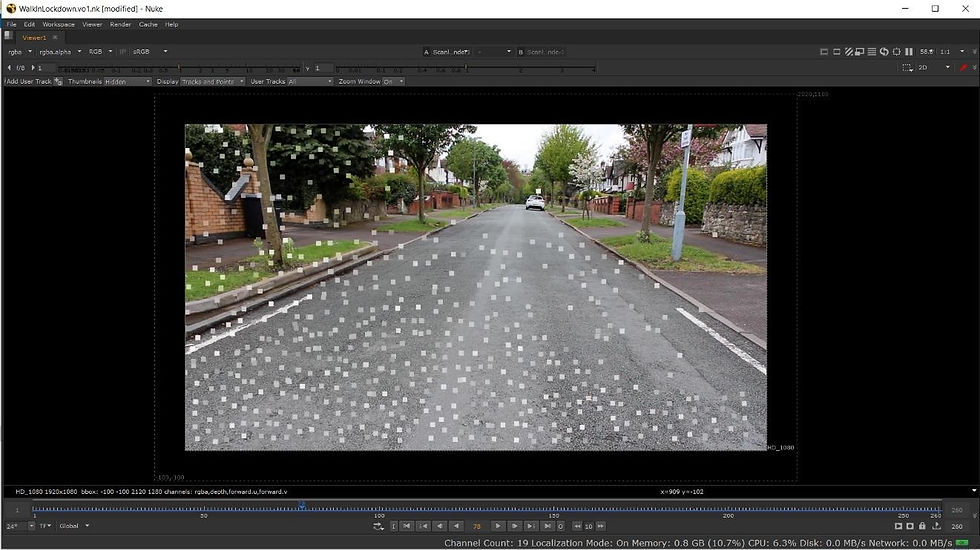

Then I exported the scene from 3D camera and added scanline-Render and used card for the ground.

I found tracking and solving errors interesting and experimentative. There are a lot of ways to place and adjust cards. I remain constant for the idea of video and I move my file forward to Maya. Meanwhile, I found free 3D assets from cgtrader and HDRI 360 from HDRI Haven for Skydome lighting as I did not have access to university 360 cameras because of the lockdown. Then I brought the scene from Nuke and my 3D assets into Maya and I set the basic settings including materials, textures and their positions according to the storyline.


I setup render setting, AOVs and render layers. Whereas I created geo and shadow layer individually as well as AOVs for effects.

After spending a long time on rendering layers, I brought them back into Nuke for final compositing stage. I prefer to work in a new file to make the project file less heavy, less complex and clear. I used Shuffle nodes for the AOVs effects, grading and color correction for color matching, merge layer for merging all the 3D assets with live footage. I also used backdrop for each asset so that I can adjust them individually. I cleaned the file with perfect naming for better outlook and output.


For the breakdown video I downloaded a plugin ‘MultiWiper’ from http://www.nukepedia.com/gizmos/other/multiwiper
I turned off all the backdrops, then I rendered each frame turning on the effect one at a time.

OURCES LINK
ASSETS USED: Walking Male -
Female -
https://www.cgtrader.com/free-3d-models/character/woman/sophia-003-animated-idlingcasual-woman Dancing Male -
https://www.cgtrader.com/free-3d-models/character/man/manuel-animated-001-dancing-freelow-poly-3d-model
Street Pole -
https://www.cgtrader.com/free-3d-models/car/sport/sport-wheels0fd1b16b5c3c148a9b2b7d878e985b3a Music for Breakdown-


Comments